
Empower Your Patients with Our New Patient Portal
Logging In
Step 1: Patients log in securely and effortlessly, gaining seamless access to their personal health information. They have the option to log in using email verification or sign in with Google.

Navigating the Home Screen
Step 2: After logging in, patients encounter a user-friendly home screen that provides quick access to all essential features, facilitating interaction with the clinic.

Scheduling an Appointment
Step 3: If a patient needs to schedule a new appointment, they click on the New Appointment.

Step 4: They then select the required details such as Clinic Location,


Preferred Therapist, Appointment Type, and Payment Method.
Step 5: With just a few taps, their appointment request is created,


reducing the administrative workload for clinic staff.
Updating Insurance Information
Step 6: If a patient needs to update their insurance information, they can easily add their insurance card using the smart AI capture feature.


Step 7: By taking a picture of their insurance card, the system automatically captures most of the insurance details, prefilling the information. They just need to review and submit, saving time for everyone.

Updating Personal and Medical Information
Step 8: Keeping personal and medical information current is crucial for providing quality care. Patients have a clear view of their profile submissions, including personal and medical details.

Step 9: If any information is incomplete or needs updating, they can access and edit it anytime before their appointment.


These details remain with them across multiple appointments, ensuring continuity of care. Managing Billing
Step 10: Simplifying billing processes benefits both the patient and the clinic. If a patient has a pending balance to pay, they can handle it swiftly. By going to the Billing tab, they can view their pending amount and pay it upfront with just a few clicks.



This improves cash flow and reduces overdue payments. Completing Intake Forms
Step 11: Enhance efficiency by allowing patients to complete intake forms ahead of time. From their appointment details, they see that their intake is not submitted yet. They can quickly access and complete their paperwork before the appointment.

Step 12: Personal, medical, and insurance information are already filled if previously provided. They proceed directly to subjective


All their paperwork is done ensuring appointments start on time. Viewing Appointments
Step 13: Staying organized helps reduce no shows and missed appointments. Patients can view all their upcoming and completed appointments in one place.
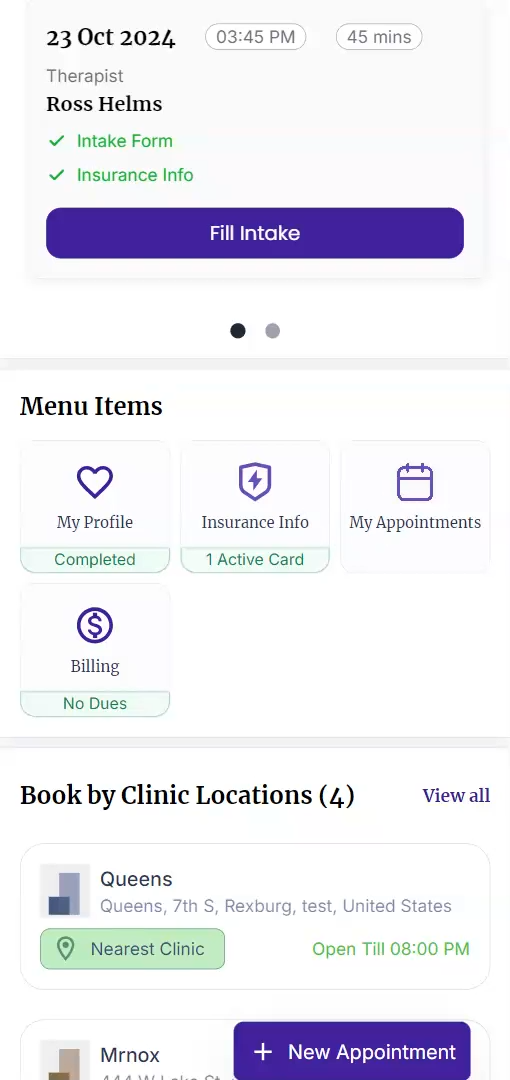
Step 14: By accessing the My Appointment section, they can see their schedule without hassles.


The patient portal enhances patient satisfaction by making healthcare management straightforward. All essential information is at their fingertips, whether it's booking appointments, updating profiles, handling bills, or completing their paperwork. It's all streamlined for their convenience. This not only benefits your patient, but also optimizes your clinic's operation. Experience how the patient portal can enhance patient engagement and streamline your clinic's workflow. Empower your patients and take your healthcare services to the next level.